
Compliance & Oversight
Two-Factor Authentication. An authenticator app, enforced for the roles you choose.
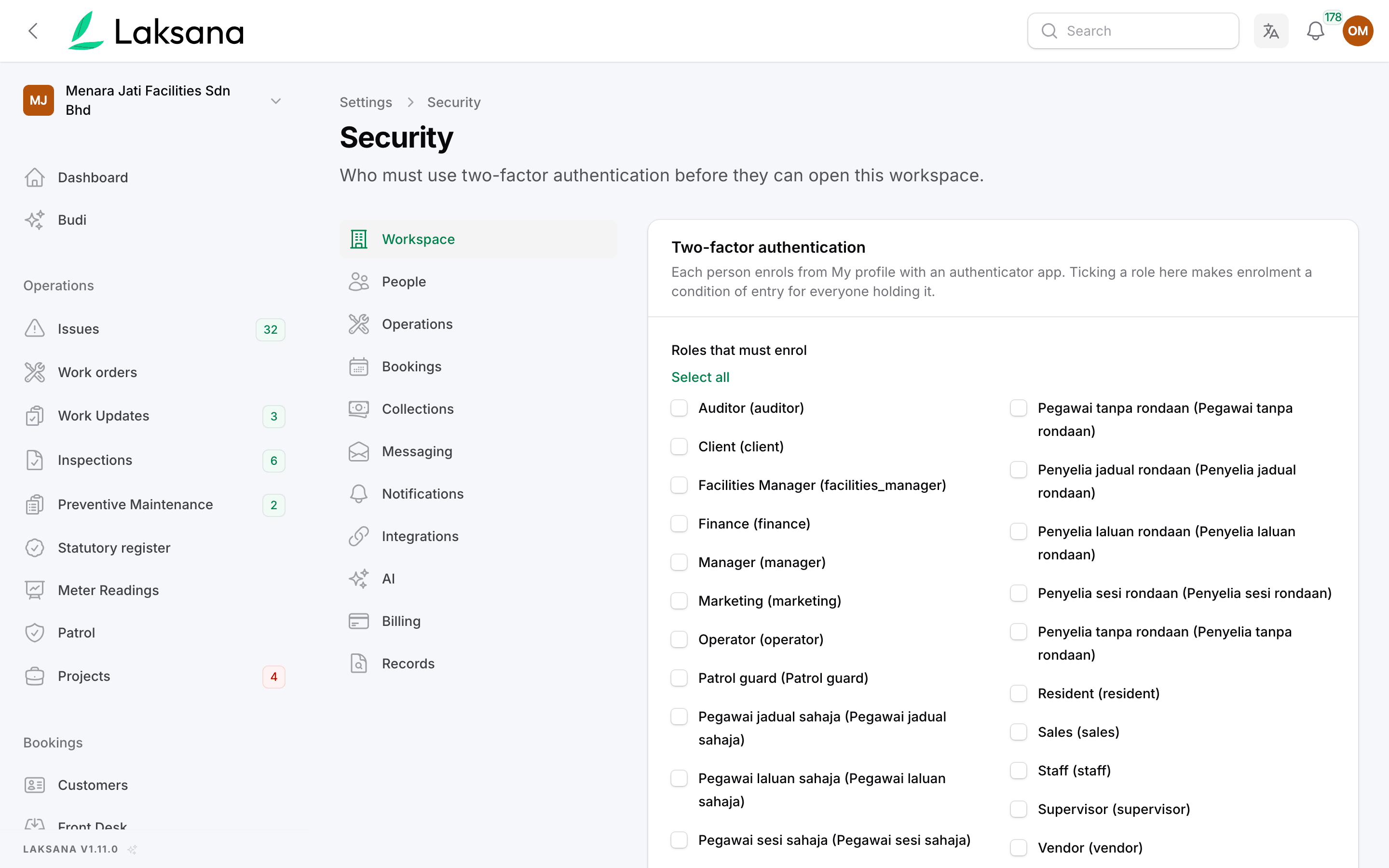
Every account can add a second factor from its own profile. A workspace can go further: tick the roles that must enrol, and anyone holding one is sent to set-up on their next visit and cannot open the workspace until it is done. The owner is never locked out.
- My profile · scan QR · confirm 1 code
- Roles that must enrol: Supervisor, Manager
- Owner role: never forced
- Recovery codes issued at enrolment
The problem
One shared password is not access control. Everyone who can approve a job should prove it is them.
Boss, I forgot my password, use mine lah
Logins get shared. A supervisor lends a password to cover a shift, and the audit trail now names the wrong person against a closed work order.
Who approved the RM 4,200 quote?
Approvers are only one password deep. Anyone who can approve, assign or close records is exactly who an attacker wants, yet a leaked password is all it takes to sign in as them.
Can we make everyone enrol? Nobody will do it
Optional security stays optional. Asking staff to turn on a second factor by email means the people with the most access are the last to do it.
How It Works
From a profile setting to a workspace rule.
Enrolment uses an authenticator app, so nothing is tied to a phone number and nothing needs a SIM.
1
Enrol
Scan once. From My profile, scan the QR code with an authenticator app and confirm one code. Recovery codes are issued at that moment.
2
Require it
Tick the roles. Settings, then Security, lists the workspace roles. Tick the ones that must enrol, such as supervisors, managers and anyone who can change records, and save.
3
Enforce it
Gate at sign-in. A member holding a ticked role who has not enrolled is sent to set-up on their next page load and cannot reach the workspace until they finish.
Key Benefits
Per role, not all-or-nothing
Only who needs it. Require it for the people who approve, assign and close, without forcing it on a resident who only reports.
The owner is never forced
No self lock-out. If the person who can edit the setting were the one it locked out, a wrong tick could not be undone. The owner role is exempt by design.
Nothing new to install
Any authenticator app. Enrolment works with a standard authenticator app on the phone staff already carry, with recovery codes for the day the phone is lost.
Works With
The rest of the security picture
Role-Based Access Control
Roles per workspace. Site-scoped members see only their own zone.
Audit Trail
Actor and timestamp. Every record change is logged, with a per-workspace retention override.
Security overview
One plain statement. Encryption, access and audit trail, and what we are still working towards, are in our facility data security overview.