Skip to content
Laksana
Compliance & Oversight

Every property in one view. Unified across all sites.

See issues, work orders and compliance status across every property you manage, all in one place.

  • Block A · Block B · Retail podium
  • Overdue · Today · This week
  • WO-1042 · Unit 14-2
  • Portfolio export · CSV
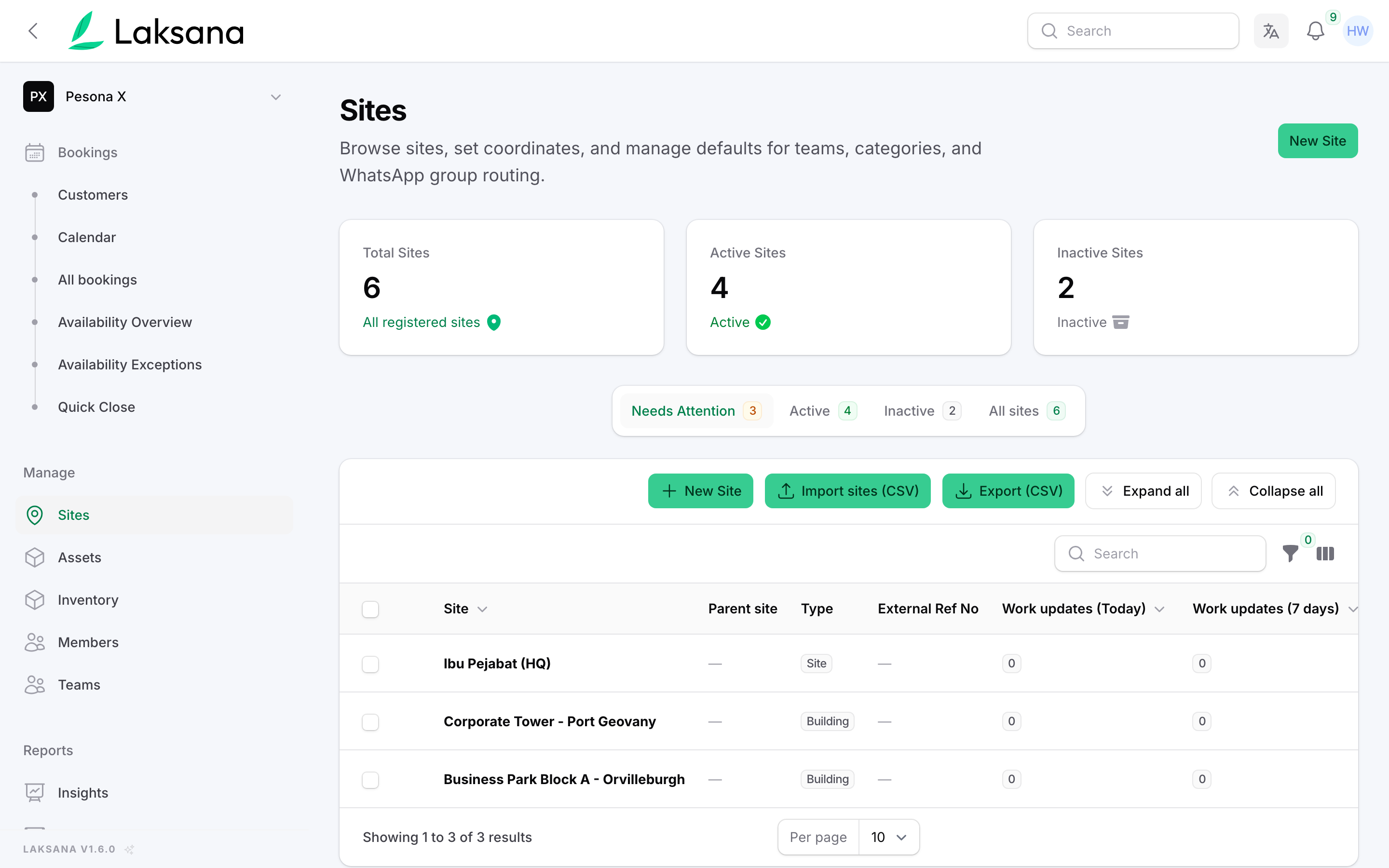
The Sites register in the Laksana console, listing every property in one workspace with counts of total, active and inactive sites, a needs-attention filter, and per-site columns for parent site, type, external reference and work updates submitted today and over the last seven days.
The problem

One WhatsApp group per site. One person scrolling all of them.

Block B lift stuck again, same as last week
One chat per site. Block A, Block B and the podium each have their own group, so whoever oversees all three scrolls three threads to find what is still open.
How many overdue at Menara Seri now?
No shared status. Without a common record, "how many are overdue?" means phoning each site supervisor and adding the answers up by hand.
The Site B checklist is different from Site A
Every site works its own way. Different sheets and different assignment habits, so the properties cannot be compared side by side.
Key Benefits

One Unified Dashboard

One operations view. Activity from every site lands in a single dashboard, so you stop jumping between WhatsApp groups.

Portfolio-Wide Visibility

Portfolio at a glance. Open issues, work in progress and compliance status across every site in your workspace.

Drill-Down Detail

Detail stays one click away. Filter and drill down into a single property when you need the site-level view.

Standardized Operations

Same rules everywhere. Apply the same assignment rules, checklists and workflows across all your locations.
My Work · every plan

My Work: your own work, across the workspaces you belong to

One list of your own work across the workspaces you belong to (work orders, issues, inspections due this week, patrol routes) grouped by workspace and site, each line opening its record. On every plan; each workspace shows the sections its modules and your role there allow.

1

Grouped by workspace, then by site

One card each. Each workspace you belong to gets its own card, split by site. A workspace with nothing open folds into one line at the end.
2

Overdue, today, this week

Filter by due date. Filter the whole list by what is overdue, due today or due this week: across every workspace at once.
3

Each line opens its record

Opens in context. A line opens the record in its own workspace, where that workspace's permissions decide what you can change.
Portfolio · Operations Health

Portfolio: Operations Health across the workspaces you belong to

Operations Health across the workspaces you belong to: a health row for each, and on Advanced and Enterprise the drill-downs (overdue issues, SLA breaches, compliance due this week, collections outstanding, bookings today, credit balance), plus a Monday email. The page exports to CSV on every plan.

1

A health row for each workspace

A score for each. A score and status for every workspace where your role can see reports, counted inside the sites your role covers. On every plan.
2

Drill-downs on Advanced and Enterprise

Tiles open the list. Each tile opens the list it counts, in its own workspace: shown where that workspace has the module and your role can open the list.
3

A CSV export and a Monday email

Export and Monday summary. Download the page as a CSV. On Advanced and Enterprise, people who can see reports also get a Portfolio summary by email on Monday morning, unless the workspace switches it off.
Organisation groups · Enterprise

Organisation groups: one company, many buildings, each still its own workspace

For an FM company or a portfolio that runs many buildings. On Enterprise, the buildings you serve are tied into one group: you place staff and vendors into them together, read one overview across the buildings in your group, and get one invoice. Each building stays its own workspace: its data, its residents and its own hires stay with it, and its owner can leave the group at the end of the billing period.

1

A staff pool, placed and removed in one step

Place once, remove once. Put a person from your pool into many buildings at once, after a preview of what will change in each. When they leave the company, one action ends every placement the group made. Each building owner is told, and anyone a building hired itself stays.
2

Vendors shared across buildings

One registry, one scorecard. Keep a contractor company once and place its staff in the buildings that use it. A cross-building scorecard appears once enough rated work orders exist; no single building's rating is shown on its own.
3

One overview across the buildings in your group

Health at a glance. Overdue issues, SLA breaches, inspections due and, where a module is used, collections outstanding across the buildings in your group, lowest score first. You open a building's records only where you have been placed.
4

One invoice for the group

Billed together. From the point a building joins, the group is billed on one Enterprise invoice for the buildings it pays for. A building with its own paid plan runs it to the end of the paid period; the group bills it after that.
5

Your building, your data

It stays yours. The group works inside a building only through the people and vendors it places, and the building's owner can remove them. If the building leaves the group, its data, residents and own hires stay in its workspace.
Works With

What fills the dashboard

Issue Map
Pins by severity. Open issues from the last 30 days plotted on the dashboard.
Work Updates
One record shape. Every property files updates the same way, so sites compare side by side.
Reports & Share Links
Filter by site. Turn a period and a set of sites into a PDF or a share link.
Compliance Checklist
Same checklists everywhere. One template applied across all your locations.

See every feature in action.