
Contractor Dispatch
Team Onboarding. Bring field staff on with nothing to install.
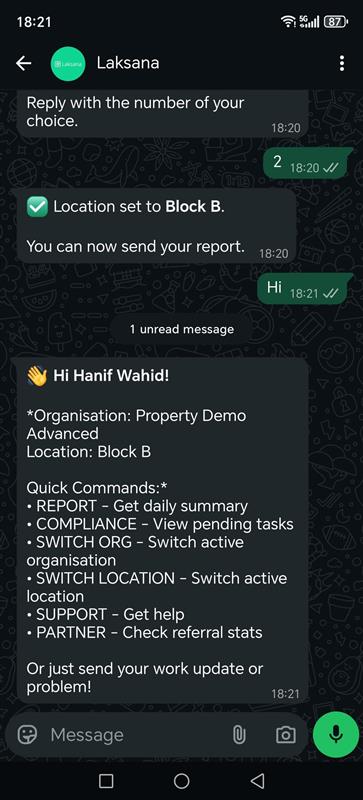
Staff report through the same WhatsApp or Telegram they already use every day. They start the same day, in the app they already know.
- Save the Laksana number
- Hi → site confirmed
- Chiller leaking in plant room L2 + photo
- 0 app downloads
The problem
Technicians stick with the apps they already know.
Boss, my phone storage is full, I cannot install it
Apps get refused. Cleaners, guards and technicians share basic phones with no space and no patience for another login.
Training on Saturday? I have a shift
Training days do not fit shifts. Rotating crews across sites mean half the team misses the session, and the rollout stalls at whoever showed up.
Just WhatsApp me, easier
Reports drift back to chat. Staff keep sending photos to a group anyway, so the new system holds a fraction of the real work.
How It Works
Save a number, send a message. That is the whole rollout.
Get your team reporting in days.
1
Uses Their Chat App
Add one contact. Staff add the Laksana WhatsApp number to their contacts, or connect Telegram with a link or QR code.
2
Send the first update
See it land. Staff message the Laksana number. The reply confirms the site, category and evidence Laksana recorded.
3
Start Reporting
Work in the chat. They begin receiving and reporting on work orders directly in the conversation.
Key Benefits
Zero Learning Curve
Nothing to learn. No new software to install. They use the WhatsApp or Telegram chat they already know.
Evidence From Day One
Stamped on arrival. Photos are stamped with time, location and site as they arrive, so the first week of reports is already usable.
Rapid Adoption
No training sessions. Skip the lengthy classroom day. Teams are typically reporting through Laksana within days.
Works With
What staff get from their first message
WhatsApp Helpdesk
Chat is the interface. Report, update and check status in one conversation.
Time and GPS evidence
Photos carry proof. Time and location are recorded with each photo.
Work Orders
Work orders arrive as messages. Assigned work shows up in the same chat.
Team Performance
Numbers without forms. Reporting alone feeds the team scorecard.